Yuma Verifier · For Bhutan's merchants
Trust the payment,
not the screenshot.
A customer scans your QR and shows you a screen that says “done”. Yuma reads that confirmation and checks the bank, amount and journal number against your sale — so a doctored screenshot never walks out with your goods.
Works with mBOB, mPay, tPay, dk, DrukPAY and GoBoB.
- Journal No.
- 482911037
- Merchant
- HANGMA SHOP
- Expected
- Nu. 300.00
- Paid
- Nu. 300.00
Works with the apps your customers already carry
- mBOB
- mPay
- tPay
- dk
- DrukPAY
- GoBoB
How it works
Three steps at the counter.
-
 Step 01
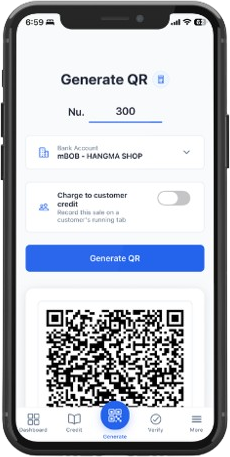
Generate the QR
Key in the amount and pick your bank account. Yuma builds a standard EMV QR that every major Bhutanese banking app can scan.
-
 Step 02
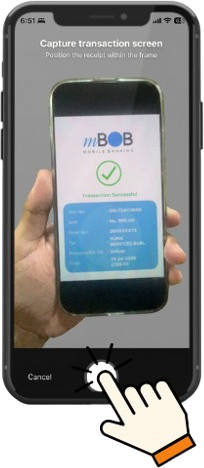
Snap the confirmation
The customer pays and shows you their screen. Photograph it or upload the screenshot — that's all Yuma needs.
-
 Step 03
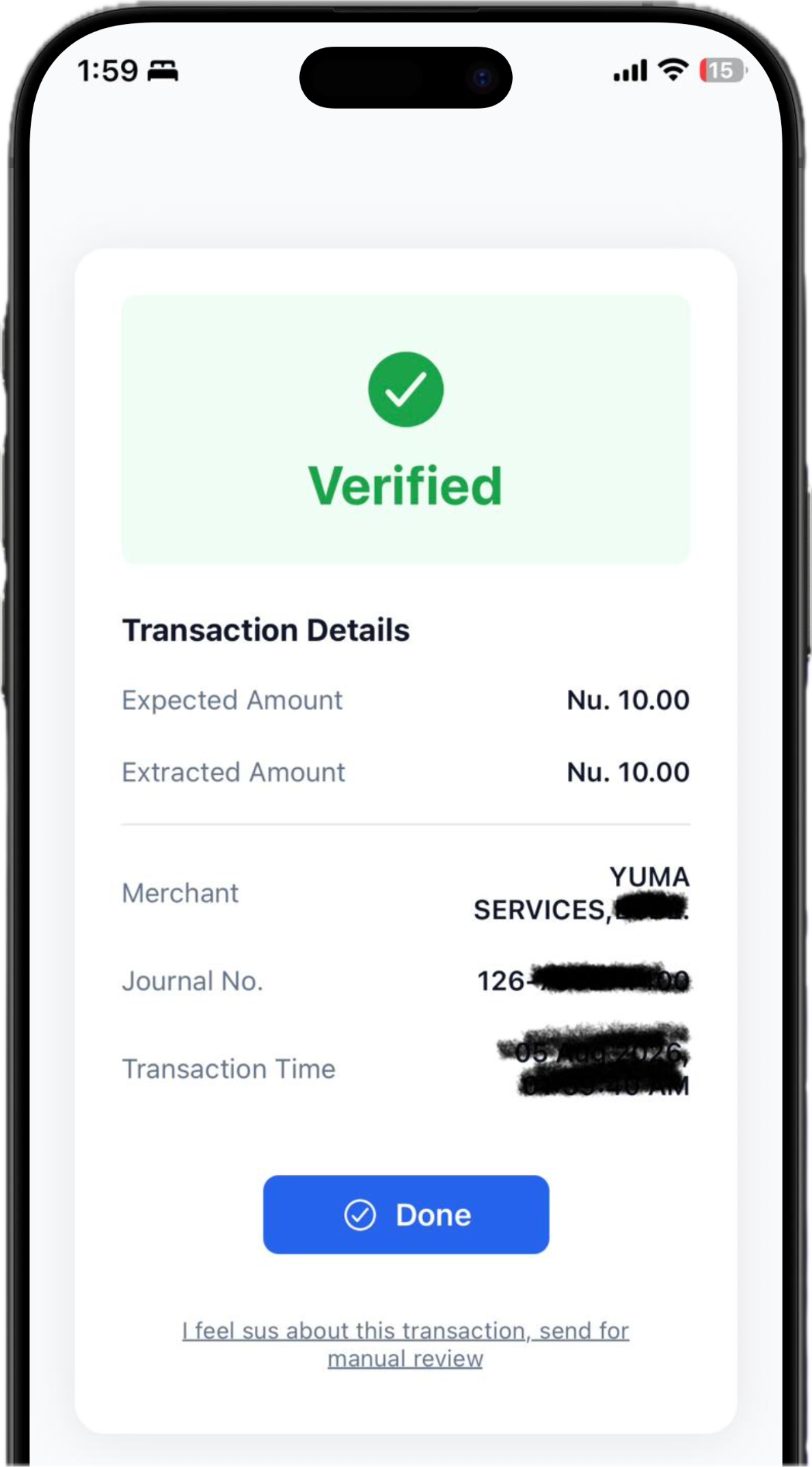
See it verified
Bank, amount, journal number and time are read and checked against the sale. Anything that doesn't line up is flagged for review.
Pricing
YUMA Verifier Subscription Plans
Streamline your payment verification, keep expenses in check, and monitor daily revenue — all in real time.
| Feature | Basic | Standard | Premium |
|---|---|---|---|
| Pricing | Nu. 299 / month | Nu. 599 / month | Nu. 999 / month |
| Monthly Scan Quota | 3,000 scans (~100/day) | 6,500 scans (~215/day) | 15,000 scans (~500/day) |
| Extra Scan Rate | Nu. 0.15 / scan | Nu. 0.12 / scan | Nu. 0.10 / scan |
| AI Photo Verification | ✓ | ✓ | ✓ |
| Instant mPay Verification | ✓ | ✓ | ✓ |
| Sales Dashboards | ✓ | ✓ | ✓ |
| Sales vs. Expenses Analytics | — | ✓ | ✓ |
| Expense Tracking | — | ✓ | ✓ |
| Bank Statement Sync | PDF Upload (Auto/Manual) | Auto Sync (Email Forwarding) | Auto Sync (Email Forwarding) |
| Customer Till / QR Display | No Ads | Up to 3 Ads | Up to 10 Ads |
| GST Compliance & Excel Export | — | — | ✓ |
Nu. 299 / month
Ideal for small shops and low-volume daily transactions.
- 3,000 Scans / Month (~100 scans/day)
- Extra Scans: Nu. 0.15 per extra scan
- Instant Verification: AI photo verification & instant mPay support
- Analytics: Core Sales Dashboard
- Till Setup: Ad-free customer-facing QR display
- Statement Sync: PDF upload (Auto/Manual)
Nu. 599 / month
Designed for growing retail businesses needing daily expense tracking.
- 6,500 Scans / Month (~215 scans/day)
- Extra Scans: Nu. 0.12 per extra scan
- Instant Verification: AI photo verification & instant mPay support
- Analytics & Tracking: Sales vs. Expenses reporting + Full Expense Tracking
- Till Setup: Customer-facing QR display supporting up to 3 ads
- Statement Sync: Automated email forwarding sync
Nu. 999 / month
Built for high-volume merchants requiring tax compliance and full automation.
- 15,000 Scans / Month (~500 scans/day)
- Extra Scans: Nu. 0.10 per extra scan
- Instant Verification: AI photo verification & instant mPay support
- Analytics & Tracking: Sales vs. Expenses reporting + Full Expense Tracking
- Till Setup: Customer-facing QR display supporting up to 10 ads
- Statement Sync: Automated email forwarding sync
- Tax & Export: GST compliance expense/purchase tracking with Excel exports sent directly to your registered email
The whole till, in one app
Everything after the payment, handled.
Verification is the front door. Behind it, Yuma keeps the books for the rest of the day — credits, cash, expenses and the numbers you report at night.
-
01
QR payment generation
EMV-standard QR codes for every major local bank app, generated from a single amount field — no terminal, no rental.
-
02
Instant payment verification
Confirmation screenshots are read and cross-checked — bank, transaction number, merchant, amount and date — in seconds.
-
03
Customer credit ledger
Running tabs per customer, with the oldest outstanding always surfaced first — no due quietly ages out of sight.
-
04
WhatsApp reminders
When a due goes stale, a polite reminder goes out over WhatsApp — no awkward phone call, no message to compose.
-
05
Cash sales & expenses
Log the day's cash and scan paper expense receipts before they fade in a drawer — stored, organised, searchable.
-
06
Dashboard & reports
Daily to yearly summaries of sales and verifications, with Excel export for when the accountant asks.
Credit, without the notebook
Running tabs that never go quiet.
Every credit sale lands in the customer's ledger. The oldest outstanding always comes up first, and when a due goes stale a WhatsApp reminder goes out — no awkward phone call, no page lost from the notebook.
Start verifying